Add Slack notifications of a low tru.ID balance

Being a developer or being in charge of a mobile or web application usually means you’re also responsible for the third party APIs that you’re using for your service — and this can often be quite an effort to keep in check. The risk of missing out on a payment when the balance is empty can disrupt critical parts of your service, especially if it involves the authentication flow.
Here at IDlayr we’ve introduced an API that lets you take control of your own IDlayr balance. You can programmatically top up your balance based on your needs and usage with the IDlayr Payments API.
Recently we released a tutorial on how to Automatically top up your IDlayr balance. This tutorial builds a minimal web server with Express JS, with one route `/sim-check` which is received as a `POST` request. If the balance is 0 when one of these requests is made, a `402` HTTP status will be returned, which is `Insufficient Credit`.
I want a Slack bot to notify me when my balance is zero!
Slack Incoming Webhook Application
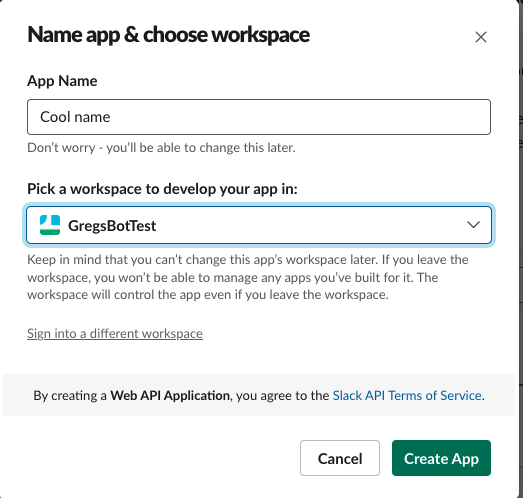
Assuming you have a Slack server, and the permissions to add new applications to the server, head over to https://api.slack.com/apps. Click the “Create App” button, and choose the “From Scratch” option.
Enter a name for your app, and which workspace it is to be added to. An example of this dialog box is shown below:
On the page you’re taken to, find “Incoming Webhooks”, activate this, and then click the “Add new Webhook to Workspace” button.
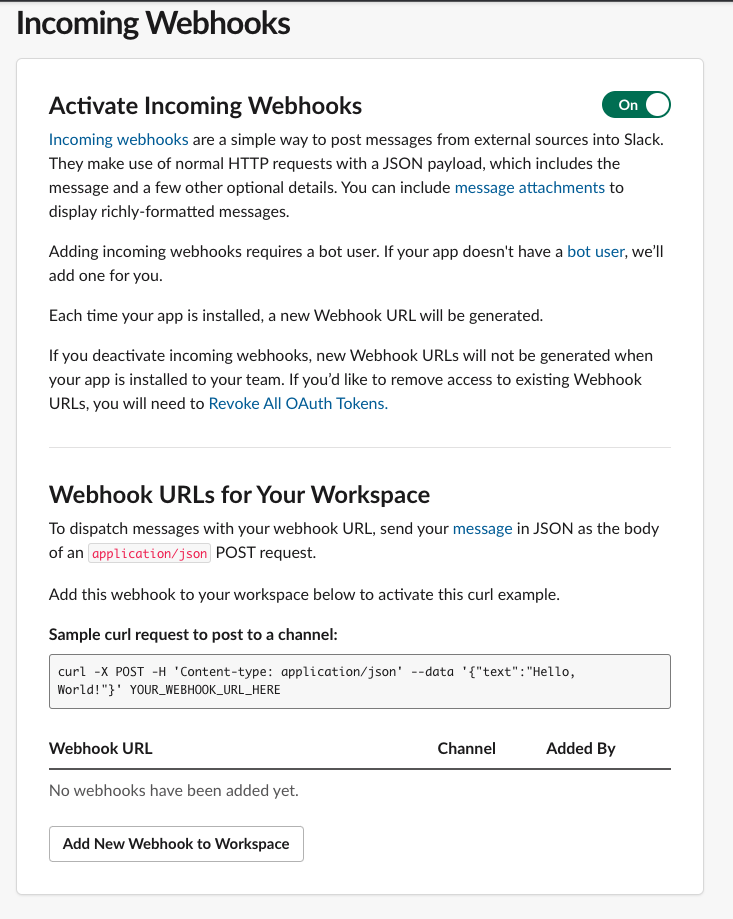
Now, choose a channel, and you’re all set up! If you now scroll down, you’ll see a cURL example POST request, as well as your new Webhook URL. Make a note of this Webhook URL, because you’ll be using it a little bit later.
You’ve now set up an application for your Slack server to post messages in a channel whenever the Webhook URL is triggered through a POST request.
Test this as a cURL request in a Terminal
Once your application is set up, you’ll see an example cURL request on the page. Copy this and enter it in your Terminal, an example of this request is shown below, without the custom fields for the URL:
Once submitted, check your Slack channel. You should see “Hello, World!” being posted by your application.

Updating the code
Store the Webhook URL in .env file
If you’ve already followed the Automatically top up your IDlayr balance tutorial, you’ll already have a `.env` file in your project directory with your IDlayr Workspace and Project credentials. Now add the following:
This is so your web application knows what the Slack Webhook URL is to submit to.
Update auto payments code to make the POST request to the Webhook URL
There are multiple parts of this example that you can use to make a POST request to the Webhook URL for notification purposes. Some of these include:
- On response of creation of SIMCheck, if `balance_snapshot` is below a certain predefined number
- On response of creation of SIMCheck, if HTTP Status is `402 Insufficient Credit`
- On response of attempting to create a top up, if top up failed
- On response of retrieving payment methods, if no payment methods or payment methods expired
For the purpose of this blog post, I’ll use the example: when creating a SIMCheck, if the HTTP status is `402 Insufficient Credit`.
Open `src/routes/tru.js` and find line 17: `if (simCheck.status === 402) {`
At the top of this condition, add the code to make a POST request to your Slack Webhook URL, with the body `{“text”: “SIMCheck returned 402, insufficient credit.”}`. The code sample below does this:
There you have it! You’ve successfully created a Slack application that listens to a Slack-defined Webhook URL.
You’ve modified a previously created auto top-up tutorial with tru.ID’s Payments API to also notify you, by making a POST request to that Slack Webhook URL. As previously listed, there are many other times you can add this functionality into the web application.
If you’re looking to implement IDlayr into your mobile or web application, I’d recommend implementing this as well.
If you have any questions or would like to discuss how IDlayr could help you verify the phone numbers of those using your mobile or web application, we’d be more than happy to talk through them. Email us [email protected] or book a demo


 English
  Spanish
  Italian